Quick summary
Set up in 4 steps
- 1On your phone or tablet, go to streamsurfers.net/mobile.
- 2If asked, allow it to install unknown apps, then tap Install.
- 3Open SurfPlayer and sign in with your username and password.
- 4Your channels, guide, movies and series load in a few seconds.
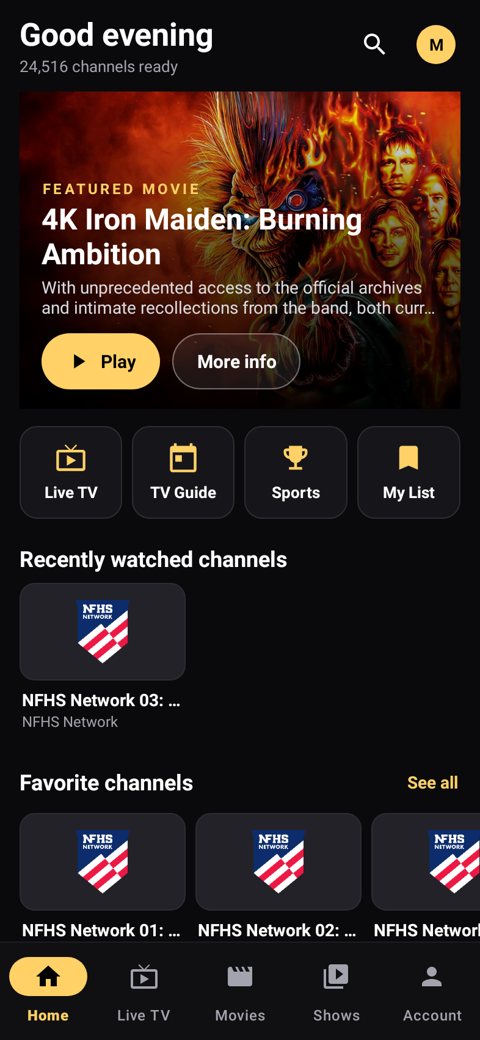
SurfPlayer Mobile, our phone app. See all SurfPlayer features →
New: SurfPlayer Mobile, our own phone app
On your Android phone or tablet, go to streamsurfers.net/mobile to download it. Then sign in with your username and password. The phone app is new, and updates come in automatically.
This guide puts SurfPlayer Mobile, our own phone app, on an Android phone or tablet, one small step at a time. It takes about 10 minutes.
Before you start, have these ready
• An Android phone or tablet (Samsung, Google Pixel, Motorola and so on), Android 7 or newer. It won’t work on an iPhone or iPad.
• Wi-Fi or mobile data working on the phone.
• Your welcome email (or WhatsApp message) with your username and password. Writing them on paper makes it easier, since you’ll be switching apps.
Part 1: Download the app
- Open Chrome (the round red, yellow and green icon) or any web browser on your phone.
- Tap the address bar at the very top, type streamsurfers.net/mobile, and tap Go (or the arrow / Enter key) on the keyboard. Or just tap this link on your phone: streamsurfers.net/mobile.
What you’ll see: the download starts. A small message appears at the bottom or top of the screen. - If the phone warns that the file might be harmful, tap Download anyway. This is a normal warning for any app that doesn’t come from the Play Store.
- When the download finishes, tap Open on the message.
Looks different? if the message disappeared, swipe down from the top of the screen and tap the finished download there.
Part 2: Allow and install
- The first time, your phone may say it isn’t allowed to install unknown apps from this source. Tap Settings on that message.
- Turn on the switch next to Allow from this source (on some phones: Allow app installs).
- Tap the Back arrow (at the bottom of the screen, or swipe in from the edge) once.
- Tap Install. Wait about 30 seconds.
Looks different? if a Google Play Protect message appears, tap More details, then Install anyway (on some phones just Install anyway). - When it says App installed, tap Open.
Part 3: Sign in
- Tap the Username box and type your username. Type it exactly as it appears in your welcome email. Capital letters and small letters matter, and there are no spaces.
- Tap the Password box and type your password the same careful way.
- Tap Sign in.
What you’ll see: your channels, TV guide, movies and series load in a few seconds. You’re done! - Next time, just tap the SurfPlayer icon on your home screen or in your list of apps (swipe up from the bottom of the home screen to see all apps).
Good to know
• SurfPlayer Mobile updates itself automatically, and you never lose your lists or favourites.
• Live TV, a TV guide, movies, series, live sports scores and favourites in one app.
• Help is built in: go to Account → Report a problem and we see it straight away.
• Already using another app? Keep it until you’ve tried SurfPlayer and you’re happy with it. Just watch in one app at a time: two apps at once counts as two connections.
If something goes wrong
- Nothing downloads. Check that you typed streamsurfers.net/mobile with the dot and the slash, in Chrome’s address bar at the very top (not the Google search box).
- It says “App not installed”. Make sure there’s some free space on your phone, then download it again from streamsurfers.net/mobile.
- It says my username or password is wrong. Check capital and small letters, and that there are no spaces at the end. Forgot them? WhatsApp us at 236-991-5203, email support@streamsurfers.net, or use our contact page, and we’ll send them again.
- Buffering? Move closer to your Wi-Fi router, or turn Wi-Fi off and on again.
- Still stuck? In SurfPlayer go to Account → Report a problem, or WhatsApp us at 236-991-5203, email support@streamsurfers.net, or use our contact page.
Take your time. You can’t break anything by pressing the wrong button: just press Back and try again.
— StreamSurfers Team
Other devices
- Onn 4K from Walmart (recommended), Android TV boxes, Android TV & Google TV: Android TV box & Google TV guide (SurfPlayer).
- Firestick / Fire TV: Firestick guide (SurfPlayer). Older Firestick? Read this.
- iPhone, iPad & Apple TV: SurfPlayer isn’t available for Apple yet. Use any player app from the App Store that supports Xtream Codes login, and enter the details below. Apple guide.
- Samsung & LG Smart TVs: these TVs can’t install Android apps, so SurfPlayer and Downloader won’t work on them. The easiest fix is to plug in an Onn 4K from Walmart (our recommended device) or a Google TV device. Or use a player app from your TV’s app store that supports Xtream Codes or M3U. Samsung/LG guide.
- Windows & Mac: use any player that supports Xtream Codes or M3U, with the details below. Windows guide.
- Linux boxes: use any player that supports Xtream Codes or M3U, with the details below. Linux guide.
- MAG boxes: send us your box’s MAC address on WhatsApp (it’s on the sticker on the back), and we’ll activate it and send you the portal address to enter under Settings → Servers → Portals.
Your connection details (for other apps)
- Server / Portal URL:
https://stream-surfers.net(port 443, https) - Username & password: sent to you after you order
- M3U playlist:
https://stream-surfers.net/get.php?username=YOUR_USERNAME&password=YOUR_PASSWORD&type=m3u_plus&output=ts - TV guide (EPG):
https://stream-surfers.net/xmltv.php?username=YOUR_USERNAME&password=YOUR_PASSWORD
New to StreamSurfers? Start your free 48-hour trial, then pick a plan, from less than $7/month ($80 per year).
Frequently asked questions
Where do I download SurfPlayer Mobile?
On your Android phone or tablet, go to streamsurfers.net/mobile. The download starts by itself.
Does it work on iPhone or iPad?
No, SurfPlayer Mobile is for Android only for now (Android 7 or newer).
My phone says the file might be harmful. Is that normal?
Yes, Android shows that for apps that don't come from the Play Store. Allow the install as shown in this guide.
Can I try it before I pay?
Yes. Order the free 48-hour trial on our site. It's $0, and your login is emailed to you automatically, usually within a few minutes.
More StreamSurfers guides
New to StreamSurfers? Start your free 48-hour trial (order it on our site and your login is emailed to you automatically within minutes), then pick a plan (whole months, no contracts). Learn more in What is IPTV?, on our blog, or see how to pay.